
For over two decades, Zimbra has powered mission-critical communications for organizations across the globe — 200 million+ mailboxes, 6,000+ deployments, 140+ countries, and a worldwide network of dedicated partners. That scale is built on platform stability. But at Zimbra, stability has never meant standing still; and every release proves it.
Zimbra Collaboration Suite v10.1.21 (Daffodil), available September 24, 2026, brings meaningful workspace innovations that make enterprise collaboration faster, smarter, and more personal. It also closes active security vulnerabilities that no production environment should carry unpatched. And with over 50 platform fixes, it ensures the infrastructure underneath performs as reliably as the teams depending on it.
Here is everything included in this release.
Three Features That Change How Teams Work
1. Mail Recall – Because Mistakes Happen
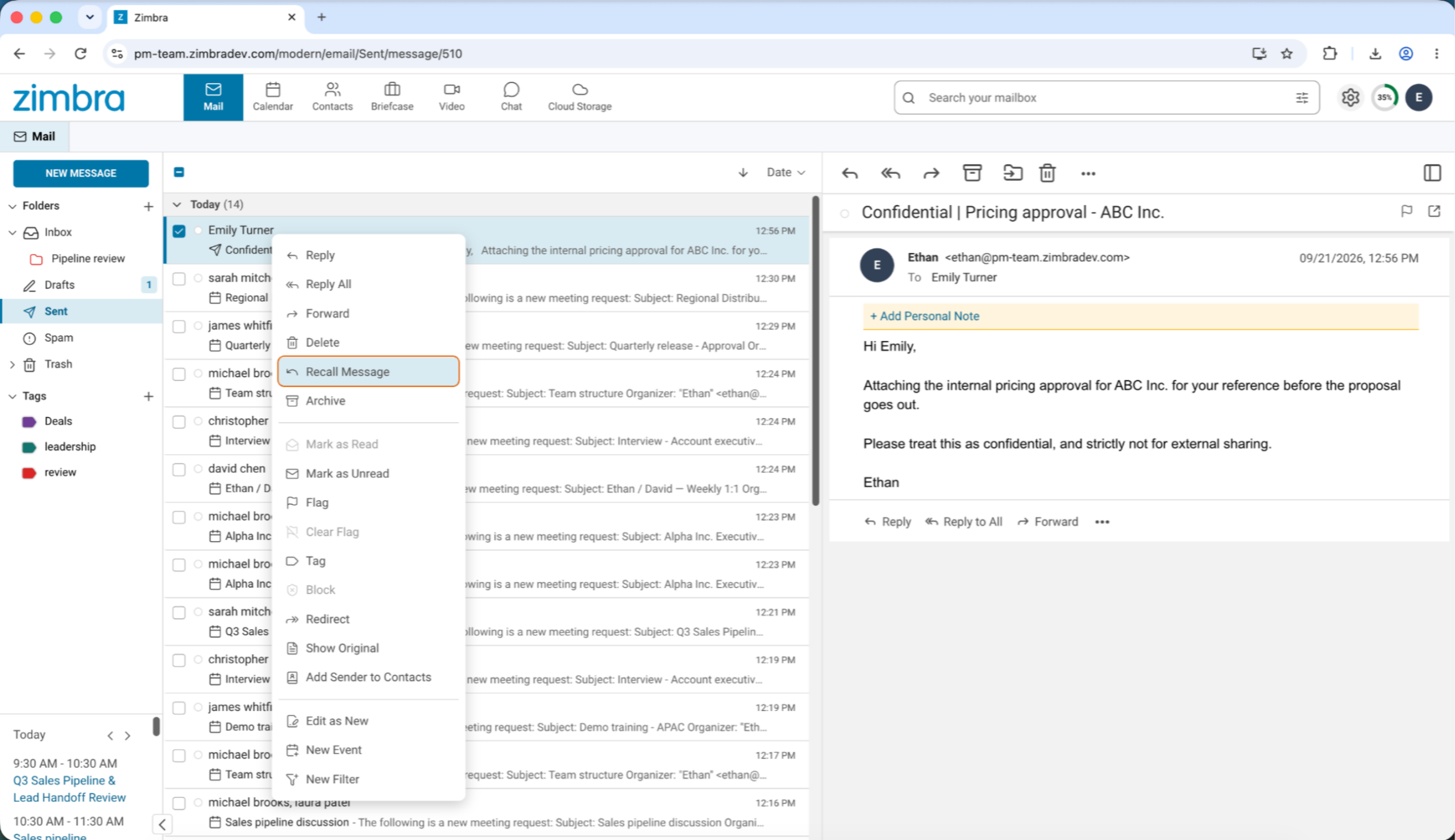
Enterprise teams send thousands of emails every day. The moment a mis-sent draft or wrong-recipient message leaves an outbox, the clock starts ticking. Until now, there was no clean way to stop it.
Zimbra 10.1.21 introduces native Mail Recall in both the Modern Web App and Zimbra Desktop.
Sent internal messages can now be recalled within a configurable time window. The message is removed cleanly from the recipient’s inbox, and an automatic status notification confirms the recall is complete — giving users peace of mind and immediate control over accidental mis-sends.
It is a focused workflow improvement with an outsized impact on how confidently and safely teams communicate every day.
2. Revamped Language Module — Enterprise Collaboration Without Borders
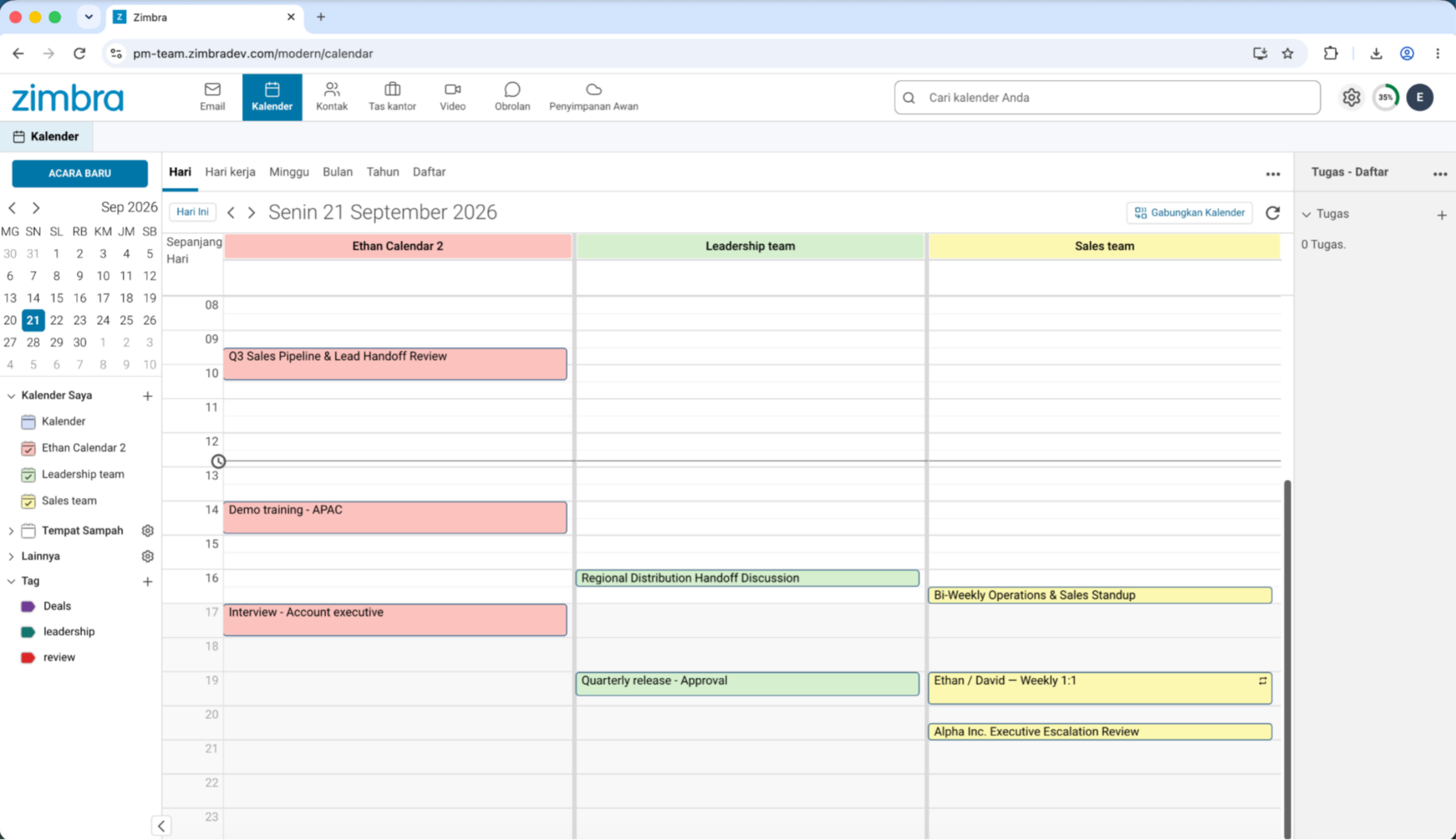
Great software is only as effective as the language it speaks. For global teams, an interface that feels imprecise or awkward in their primary language introduces subtle friction every single workday.
In Zimbra 10.1.21, our engineering team conducted a comprehensive, proactive review of the entire Modern Web App localization framework — updating over 6,000 UI translation phrases across the interface and addressing more than 50 direct customer-reported translation requests. As a result, everything on your screen feels authentically local, not merely translated.
Beyond accuracy, Zimbra 10.1.21 also adds native language support for Bahasa Indonesia and Filipino (Tagalog), extending the platform’s reach to enterprise teams across Southeast Asia who can now work in their primary language from day one — and experience Zimbra the way it was always meant to feel.
3. Per-Domain IdP & SAML Routing — Identity Management at Scale
Organizations running multiple business units, customer brands, or managed tenants on a shared Zimbra environment have historically faced friction around authentication. A single shared Identity Provider meant shared configuration risk and the constant threat of cross-domain SSO conflicts.
Zimbra 10.1.21 solves this cleanly.
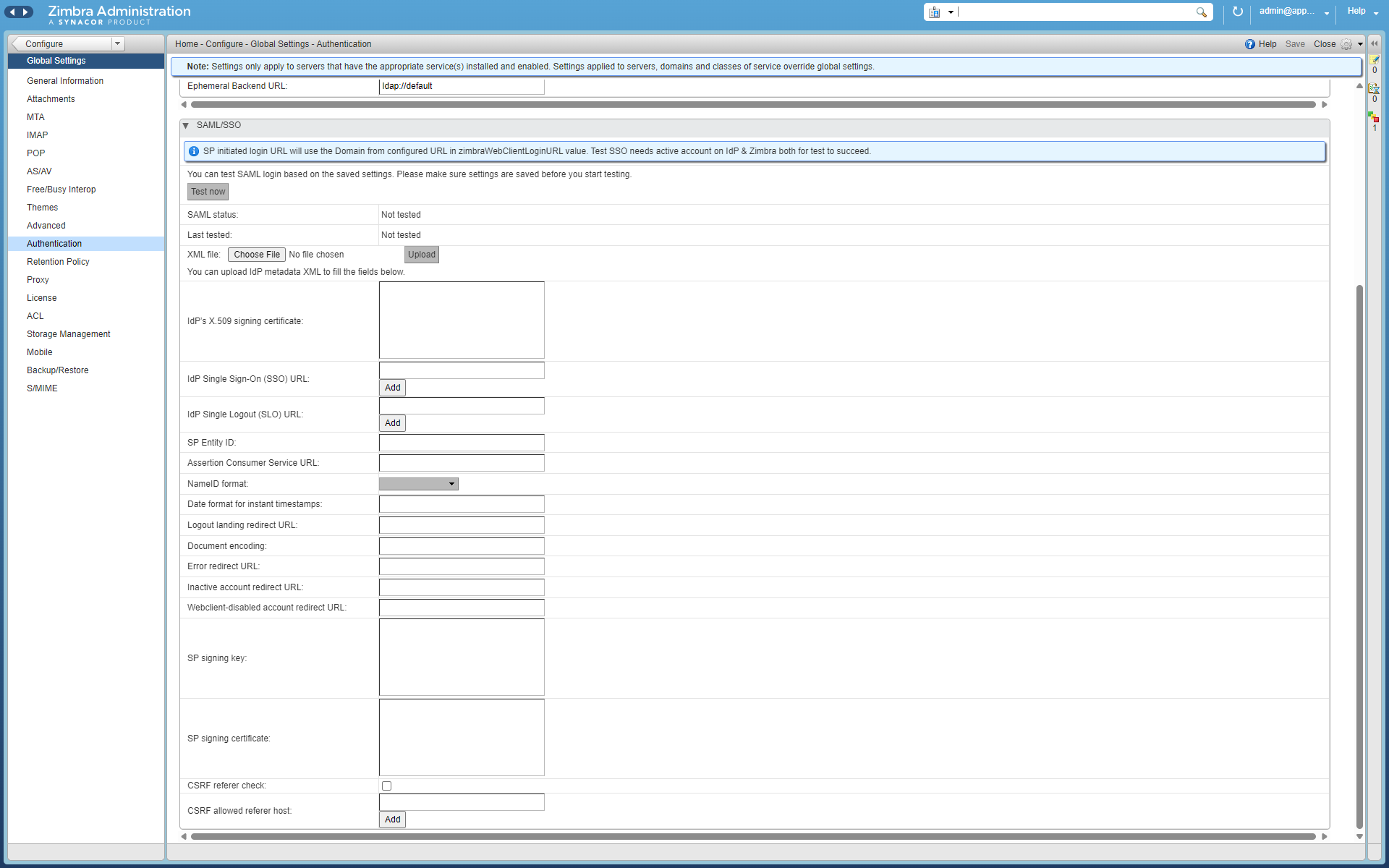
Administrators can now assign a distinct Identity Provider to each domain. Users are automatically routed to their domain’s designated IdP at login, with fully isolated authentication metadata per domain — no configuration collisions, no cross-tenant leakage.
And for the first time, none of this requires editing configuration files at the command line. A new point-and-click SAML Setup Wizard in the Admin Console makes domain-level authentication accessible to any administrator. IdP metadata import, certificate management, and domain authentication configuration are handled entirely through a clean graphical interface — no server access required.
For MSPs and hosting partners managing multiple client tenants, this is a significant operational unlock that removes a longstanding complexity barrier.
More in This Release: Everyday Enhancements That Add Up
Alongside the three headline features, Zimbra 10.1.21 delivers a focused set of workflow improvements for users and administrators across the platform:
| Enhancement | Who It’s For | What It Does |
|---|---|---|
| Self-Service Account Clean Up | All Users | Sort emails by size, view storage breakdowns, and bulk-delete to manage mailbox quota without raising an IT ticket. |
| Inline Quick Reply & Message Redirect | All Users | Reply within conversation threads without losing context; resend messages to new recipients while preserving original sender address and formatting. |
| Density Modes & Keyboard Navigation | Power Users | Relaxed, Regular, or Slim inbox view modes, and use arrow-key navigation across message lists with the preview pane on or off. |
| Side-by-Side Multi-Calendar View | All Users | Align multiple personal and shared calendars in Day view with independent color coding and synchronized time slots. |
| Guided First-Time App Tour | New Employees | An interactive onboarding walkthrough introducing essential webmail features at first login; restartable from Settings at any time. |
| Default Email Templates | All Users | Pre-written message templates now enabled by default during email composition; manageable at admin or individual user level. |
| Full-Chain S/MIME Validation | Security Teams | Signed outbound emails automatically include intermediate certificate chains, eliminating trust validation errors at recipient mail clients. |
Security Hardening: High-Priority Platform Defence
Zimbra 10.1.21 includes essential security updates addressing account protection, remote authentication, web client safeguards, and core runtime components. Environments running unpatched versions carry unmitigated security risks, and administrators are strongly advised to apply this release immediately.
To protect active deployments while giving IT teams clear visibility into risk areas, key fixes in this release address:
- Account Recovery & Identity Workflows: Neutralizes security flaws within self-service password recovery logic that exposed user accounts to unauthorized access.
- WebDAV Remote Access & MFA Enforcement: Corrects pre-MFA session validation logic, strictly requiring full multi-factor authentication completion before granting WebDAV endpoint access.
- Classic Web Client Safeguards: Resolves stored cross-site scripting (XSS) vectors in the Classic Web Client to prevent malicious script execution via crafted email content.
- Core Runtime & Infrastructure: Upgrades the underlying execution environment to OpenJDK 17.0.19 and refreshes web server cryptographic modules.
Platform Stability: 50+ Fixes Across the Stack
Reliable daily operations depend on what happens beneath the surface. Zimbra 10.1.21 resolves over 50 targeted issues across connectors, server infrastructure, and webmail:
- Zimbra Connector for Outlook (ZCO)
Outlook no longer faces stability issues during two-factor device re-validation or when authentication attributes are empty. MIME boundary parsing has been corrected so complex email attachments always render in full. Domain password expiration now triggers an explicit credential prompt in Outlook rather than silent send/receive failure. Oversized attachment bundles are handled cleanly with a dedicated notification dialog that identifies the offending files. - Server Operations and Storage
An IMAP socket resource leak triggered by out-of-bounds fetch requests, including Apple Mail on iOS 18, has been resolved, preventing mailbox locking and preserving server memory. An automated daily background utility now clears accumulated temporary processing files at 1:00 AM server time, preventing disk space inflation over time. System-wide validation now blocks email forwarding rules that target a user’s own address or alias, eliminating accidental mail loop conditions. Large account deletions are handled more safely, with directory cleanup deferred until mailbox purges are fully complete. - Webmail, Shared Folders, and Licensing
Users can now move and delete messages within individually mounted shared folders. Deleting items from a shared folder correctly places a copy in the user’s own Trash, consistent with expected behavior across all clients. Cross-interface signature editing inconsistencies, saved search sorting, print preview freezing, folder hierarchy display in move dialogs, and external address book autocomplete have all been resolved. License accounting now correctly handles full inheritance chains for domain default configurations, and outbound license communications support HTTP/HTTPS proxy routing.
Four Reasons to Upgrade to 10.1.21
1. A platform that keeps getting better
From user control innovations like Mail Recall and Self-Service Storage Cleanup to Modern Web App refinements side-by-side calendar views, density modes, inline replies, a guided onboarding tour, and 6,000+ translation fixes with native Bahasa Indonesia and Tagalog support, every release makes daily email and collaboration smoother, more responsive, and more capable.
2. Enterprise identity, simplified
Per-Domain IdP & SAML Routing gives each domain its own Identity Provider with isolated authentication metadata to eliminate cross-tenant SSO conflicts. The new Admin Console SAML Setup Wizard lets administrators handle domain SAML configuration, metadata imports, and certificates entirely through a point-and-click UI with no manual configuration files required.
3. Proactive Security hardening included
Delivers urgent security patches for self-service account recovery, WebDAV MFA enforcement, Classic Web Client XSS safeguards and OpenJDK 17.0.19. Unpatched environments carry documented risk and should upgrade immediately.
4. Platform stability and operational confidence
Over 50 targeted fixes across Outlook connectors (ZCO), IMAP server operations, shared folder workflows, and automated disk cleanup ensure the predictable, dependable performance enterprise operations require.
Upgrade to Zimbra 10.1.21
Zimbra 10.1.21 is recommended as a High Priority upgrade given the security and stability improvements included in this release. Validating the update in a staging environment prior to production deployment is recommended.
Read the Full Release Notes →
Patch Installation Guide →
Contact Zimbra Support →
No comments yet.