

« Previous entries Next Page » Next Page »

Use the Sticky Notes Zimlet to make quick notes about an email

Posted in PowerTips - Users, Zimlets by Raja Rao on July 14th, 2010

Lot of times you need to make a quick note about something in an email or a little reminder for yourself like “I need to confirm those dates” or “add John’s phone number” or “attach the PPT” etc.  But there is no easy way to capture that thought instantly.  Sticky Notes Zimlet helps solve that problem by allowing you to attach a note to a particular email.

The Sticky Notes Zimlet is really easy to use…all you do is make a quick note and attach it to your email. Once you attach your Sticky Note, it will automatically pop up the next time you re-open your email.

How to create your own Sticky Notes:

Simply select an email and click on the “StickyNotes” toolbar button or drag and drop your email onto the Zimlet to add your notes.

StickyNotes in Contacts (v1.6+):

Similar to emails, you can attach notes to Contacts as well. Simply select a Contact and press “StickyNotes” button.

StickyNotes in Calendar (v1.6+):

Similar to emails, you can attach notes to Appointments as well. Simply select a Contact and press “StickyNotes” button.

How to Enable the Sticky Notes Zimlet:

Click on “Sticky Notes” in the left overview pane and select the following:

a. Select “Add StickyNotes button to main toolbar” checkbox

b. Select “Enable Sticky Notes Zimlet” checkbox

StickyNotesPreferences

How to Find Your Sticky Notes (via Tags):

After your enable the Sticky Notes Zimlet, a yellow-colored tag called “Emails with StickyNotes” is created. When you attach a StickyNote to your email message, your email or conversation will have a yellow tag. This yellow tag is removed when the Sticky Note is deleted.

How to Search for a Sticky Note (via Tags):

You can search and keep track of all of your Sticky Note emails by clicking on the tag or by searching for them in the main search bar.

Download:

You can download the Zimlet here:  http://gallery.zimbra.com/type/zimlet/sticky-notes

Release Notes:

1. Version 1.6 now allows attaching StickyNotes for Contacts & Appoints as well

2. Version  1.5 adds scalability via CustomMetadata API. You can now add Sticky Notes to as many of your emails as you want.

2. Version 1.5+ is only compatible with ZCS 6.0.7+


Appointment Summary Zimlet – Know what your Calendar looks like for the day

Posted in PowerTips - Users, Zimbra Web Client, Zimlets by Raja Rao on July 7th, 2010

Every day, when you first login, this Zimlet scans your calendar and sends out a summary email about the current day’s events.

This Zimlet helps both frequent and lite calendaring users in different ways:

1. For power-users, this is like having a personal assistant; who summarizes appointments for the day, providing a concrete idea as to how many meetings you have.
2. For general-users, the Zimlet helps in reminding you that there is a meeting to prepare for (in case you’ve forgotten)

To make it easier to read, the appointments are sorted and divided along two simple categories:  Those that need your immediate attention (e.g confirmed or new events) and others that don’t (those you’ve marked tentative, free, out-of-office, or declined but not yet deleted).

Download:

Available in our Zimbra Gallery over here

Rate & Review:

After you have used the Appointment Summary Zimlet, please come-back to share what you thought of it at our Gallery.

PS: This is one of our favorite recent Zimlets within the Zimbra team, and we hope you enjoy it too!


Open Enrollment: Zimlet Development Courses 2010

Posted in /etc, Community, Zimbra Web Client by Mike Morse on November 19th, 2009

We held the first hands-on Zimlet training over at our London offices back in October, where Raja Rao put together such a great presentation and collection of modules that we decided to roll it into a permanent series.

If your organization is interested in enhancing Zimbra via communication with external services, adding extra functionality via widgets and application portals, or just wants to increase usability of existing inline content: We cordially invite you to our beautiful (and relatively warm) Sunnyvale, California campus February 23-24th. Whether your somewhat new to basic object oriented JavaScript programming or already familiar with advanced Zimbra specific SOAP, JSON requests, and hooks; our front-end engineers and best mashup gurus will be available to help get your coding started.

Details on this two day course’s agenda and the registration form can be found here: Zimbra-Training-Registration-Zimlet-Course.pdf

-For more information contact us or email training@
-Local Hotel options: Zimbra-Training-Location-Sunnyvale.pdf
-There are partner discounts, though any member of the community is welcome to attend even if you aren’t a network edition customer.
-Can’t make it in December? We’re holding another in May tentatively the 4th through 5th. Be sure to let us know early if your interested – space is limited and will fill up fast.


Find out about other sessions (for admins, helpdesk staff, and even end users) over on the training site.


Zimlets Go Back to School – Part 3: Q&A with the University of Wisconsin-Milwaukee

Posted in Education, Zimbra Web Client by Zimbra Team on September 24th, 2009

In part three of this series, we’d like to introduce you to Bruce Maas, CIO of the University of Wisconsin-Milwaukee. Bruce has been an esteemed advocate for Zimbra since the campus switched over to our offerings two years ago. If you recall, we highlighted some of UWM’s creations in our original post, including their White Pages, Availability, Help Tool, and Subscription Center Zimlets. We recently caught up with them to get the low down on Zimbra happenings across campus.

Read more from our Q&A with Bruce below:

How many people are using Zimbra on campus?
Approximately 50,000 users since last summer. Practically every department had a different setup. We recently had our fourth Microsoft Exchange migration, this time with University Police, and they are already productively utilizing Zimbra as their email and calendaring tool. We also had three Groupwise environments migrate, and they had very few issues after conversion.

What’s your favorite thing about Zimbra?
Given the state of the economy and our budget, the favorite thing for me is that I am able to deploy services for mail and calendar for 50k accounts with under three full time employees total, all staffing included. The system administrators who formally supported distributed Exchange and Groupwise environments have now been able to focus on higher value added services for our faculty.

What’s the best piece of feedback you’ve gotten since deployment?
That’s easy. The calendar has been a strong focus since the start, and our end-users really appreciate that we now have a fully enterprise calendar linking faculty, staff, and students in one integrated environment. We have connected the calendar with our other sources, such as our course management tool, student system, and tutoring/mentoring scheduler; everyone has responded very favorably to each new feature.

Have any institutional issues been solved or mitigated since introducing Zimlets?
We have a big test ahead of us this fall with the debut of our Subscription Center Zimlet. We expect it to have a positive impact on student retention through the ability to better organize all aspects of the lives of new students from the first day they show up on campus. I can’t wait to see the results.


You can get further insight about UWM’s deployment here. Need help with your own concept – or have an design idea for extending Zimbra? Let us know over in the forums.


Zimlets Go Back to School – Part 2: Q&A with Wayne State University

Posted in Education, Zimbra Web Client by Zimbra Team on September 22nd, 2009

In our first post of the series, we highlighted a few of the recent creations coming out of Wayne State University – their Broadcast, AccessID, and Anti-Phishing Zimlets. Given the unique customization abilities, there are many reasons and motives behind every Zimlet’s conception. So, we decided to check in with Systems Analyst Rob Thompson, to provide some context behind their latest extensions.

Highlights from our Q&A with Rob are below:

How long have you been running Zimbra?
The university started evaluating mail systems in earnest during the 1st quarter of 2008. We went full production for all of our 70,000 users in June 2009.

What’s your favorite Zimlet and why?
One of the most popular is our AccessID Zimlet. Our previous email system did not have an extensible API that would allow us to integrate our directory information into email content. Zimbra’s ability to create context-sensitive events allows our users to mouse-over an internal WSU ID number (which are quite cryptic) and instantly retrieve a name, department, phone, email address, and other data from our directory about the referenced user.

Were there any campus issues in particular that inspired you to leverage mashups?
Integration with student content applications and existing frameworks are where we are seeing the most demand, and thus where we are focusing our development. This includes L-Soft Listserv, a home-grown announcement service, class schedule information and more. Since going live, we have had a steady stream of requests to leverage external systems into the Zimbra user interface. Many of these projects are already well underway.

What are students and/or faculty saying about your Zimlets?
Since we’re very early on in our rollout, every compliment seems to come with another request for more integration work! In the past we have had to turn these requests down, as they were simply not possible with the software at hand. So, we’ve got our work cut out for us, and are very excited to have the opportunity to accomplish them with Zimbra.


Stay tuned for part three. To answer some common questions from our first entry: A few of the Zimlets mentioned aren’t available in the gallery, since they are written in a way that interacts with specific back-end systems at each institution. Where possible the authors are working to separate usable code for the broader benefit of all. In the meantime, you can get help with connectors like these and your own ideas over in the community forums.


Zimlets Go Back to School

Posted in Education, Zimbra Web Client by Mike Morse on September 4th, 2009

It’s September, which signals the time students will be returning to school. At Zimbra, this means continuing our work with the more than 500 institutions that have deployed the Zimbra Collaboration Suite Network Edition worldwide. We are thrilled to help educators and students alike with their communication needs in over 33 countries, including institutions such as Kansas State, Texas A & M, Stanford, and the University of Pennsylvania.

With “back-to-school” in the air, we thought it was an appropriate time to check in on some of our education customers. Turns out, Zimbra’s rich calendaring and collaboration features, compatibility with other email clients and campus systems, open technologies, easy branding, administrator-friendly architecture, in both hosted and on-premise deployment options aren’t the only reasons why Zimbra continues to be the #1 choice for education. Today, schools are growing contributors to our highly regarded Zimlet program. With customized mash-ups, more and more educational institutions at all levels are taking advantage of Zimbra’s open source roots and community, by easily integrating ZCS with other online tools that students and faculty interact with daily.

A few universities have recently shared with us some examples of useful implementations:

Wayne State University
Message Authenticity Zimlet: Helps the student confirm the authenticity of a message sent by Wayne administration. Users may choose alternative delivery methods and rate the message’s importance relevance to them in order to provide feedback for future news updates.
AccessID Zimlet: This hover-over Zimlet provides users with a quick look into the university directory, making sense of arcane user ID codes.
Anti-Phishing Zimlet: Beyond just marking something as spam, this Zimlet allows users to report an email as a serious phishing attempt into an automatic tickiting system, so that Wayne administrators can research if other users have inadvertently provided personal information when they shouldn’t, and then report back to the campus about any complaint to be aware of.
University of Wisconsin-Milwaukee (UWM)
Subscription Center Zimlet: This Zimlet acts as the single source for consolidated public calendar information enabling users to search, browse, and subscribe to assorted campus and community calendars.
White Pages Zimlet: This Zimlet integrates an existing directory server to provide various phone number, office location, and home address information of students, faculty, and staff, based on their existing privacy settings.
Help Zimlet: Gives users quick access to custom tailored documentation for the campus community as well as video screencasts demonstrating how to use and configure various features of the Zimbra web interface.

Simon Fraser University
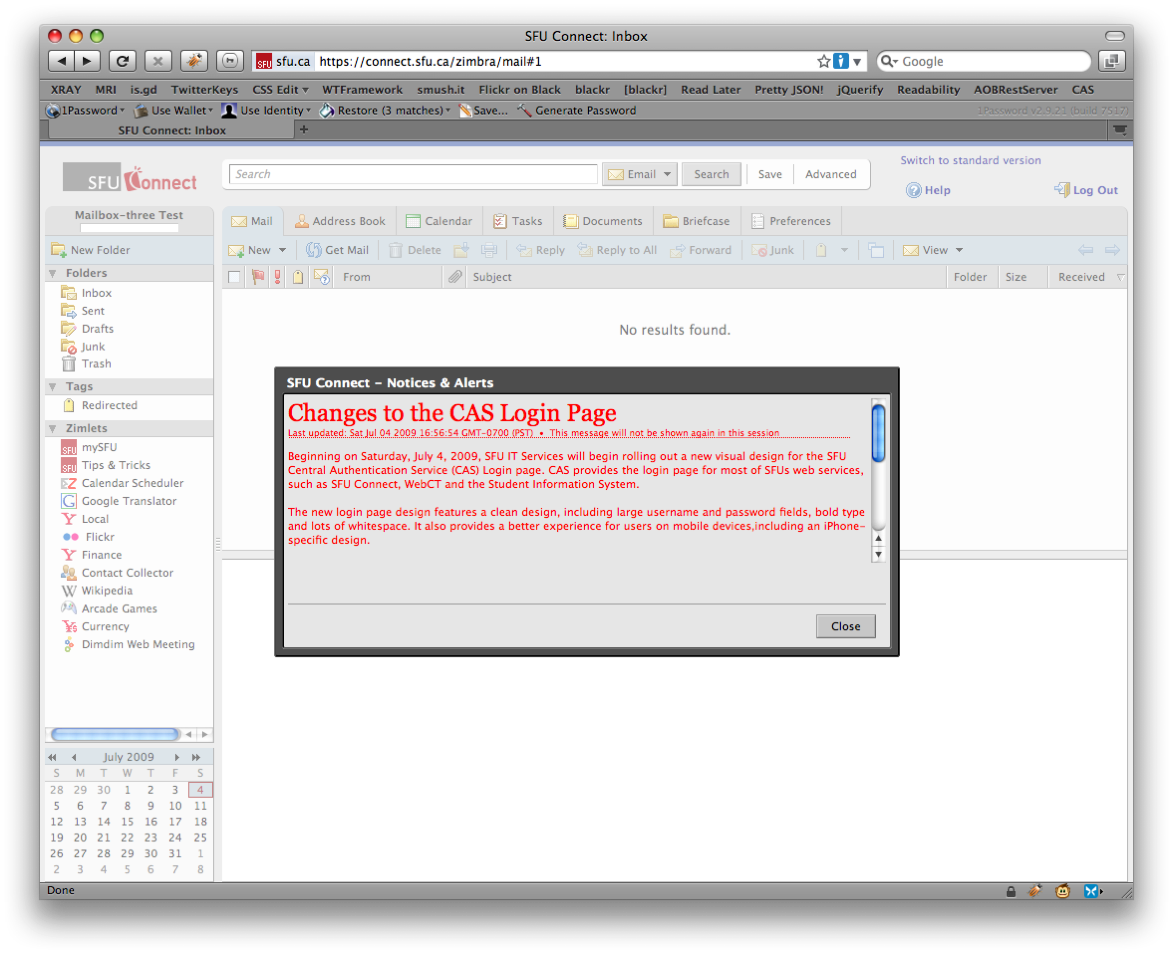
Course Resources/mySFU Zimlet: Content put out by professors for a specific class, and also connects to details on course books, library records, campus news, and more.
Tips & Tricks Zimlet: A customized interface with a daily tidbit of useful info for getting the most out of the Zimbra experience as well as computing accross campus.
Broadcast Alert Zimlet: Gets the word out to anyone with Zimbra currently open or upon next login. With students on the system so often to get work done, it’s a great way to send a critical notice.

Stay tuned and we will continue the series with additional screenshots plus more in depth Q&A with a few Zimbra educational customers.


Yahoo! Emoticons in Zimbra Mail

Posted in PowerTips - Users, Zimbra Web Client by Raja Rao on August 5th, 2009

For the last post in the Power Zimlet Series (Attach Email, Ignore Conversations, Contact Organizer, Task Reminders), we are ending on a lighter note.

Zimlet 5: Emoticons in Email

Who doesn’t love emoticons? They are core part of life online and I admit am a huge fan of them.

Historically Zimbra has always supported emoticons – but only in IM.   For ZCS 6.0 (coming very soon) we have made some enhancements to the Zimlet platform (including the ability to create new ‘application tabs’) that enable us to now support emoticons in email compose as well.

When you write an email you can simply enter your standard text emoticon [example: :)  ], or now you can select an emoticon visually using a button in the compose window that will insert the text for you (see below).  When you receive an email, emoticon text is automatically displayed as an image.

Now, emoticons are great but occasionally you might not want to see emoticons in your email, may be because some code or some text that’s unintentionally matching emoticons. So, we have added “Temporarily Disable in Mail” to help disable emoticons. Right click on the Zimlet in the left pane, and select it, then reopen the email. Further, Double click on Zimlet in the over-view panel to permanently enable/disable it.

Enjoy!

PS: This will be shipped as a default Zimlet in ZCS 6.0.

Zimbra Emoticon


Contacts Organizer Zimlet: 5 ways to organize your contacts

Posted in Zimbra Desktop, Zimbra Web Client by Raja Rao on July 27th, 2009

Power Zimlet #3

If you have 100s or even 1000s of contacts and perhaps also using multiple address books and want to organize them, this one is for you. With lot of contacts also comes organization or maintenance, syncing and other issues.  For example, say you want to move all your company’s contacts into one address book so you can share company’s address book to someone,  or,  say file all of them by “(Company) First Name Last Name” format so its easy to sort them and differentiate them,  you will immediately see there is no easy way to do that.

And that’s where this Zimlet come in. Its  a very powerful and flexible Zimlet and provides 5 different ways (& several combination) to help organize your contacts. It also organizes across multiple Address books (simply use ctrl -key or Shift-key to select multiple folders).

1. Move or Cleanup:
- Move all contacts with xyz domain  in ALL address book folders into xyz Addressbook.

For example,  say  you want to move all gmail contacts to folder called ‘gmail friends’.  Assuming you already have an addessbook folder by name ‘gmail friends’,  here is how you would do that:

STEPS:

  1. Select “Contact’s email contains” menu,
  2. Enter “gmail.com” in the next field
  3. Select all the folders using Shift key or ctrl key  from “in folder(s): ” menu
  4. Select ‘Move Contacts to:’ Radio button
  5. Select the folder ‘gmail friends’
  6. Press Organize

Other use cases:
-  Move some Contacts in ALL  Address Book to Trash

-  Move ALL  Contacts in Some Address Book to Trash

-  Move ALL  Contacts in ALL Address Book to Trash

2. Merge:

- Move all contacts  in multiple Address-books(say AB2, AB3 & AB4)  to a single address book(AB1)

3. “Sort and Store” aka “file-As”:

- Zimbra by default sorts contacts by last name but lot of people want to sort by Company and one of the way you can achieve this is by filing them as “(Company) Firstname Lastname” or “Company Lastname, FirstName” or “Company”

- You can use File-as Action to simply file all your contacts in a specific format for consistent appearance.

4. Tag:

- Tag all contacts that contains some domain(say zimbra.com) with some tag(say: zimbra folks)

5. Contacts with Phone number(for mobile sync): This is one of the special actions I added to help mobile users to move all the contacts that has phone number to one folder. Which in-turn makes it easier to make phone calls.
e.g. move all contacts with phone numbers to “has phone number” Address book. Now, sync it to mobile phone and you can be sure to know that the contacts in that folder has some phone number.

Contacts Organizer

PS:
1. For more details and to download: Visit Gallery
2. Please make sure to to take backup of all your Address books  before using this (from Preferences > Address Book > Export)


Ignore (unimportant) conversations

Posted in Zimbra Desktop, Zimbra Web Client by Raja Rao on July 24th, 2009

Power Zimlet #2

Every now and then we get messages from co-workers and others that we are not interested in. It gets annoying especially when  it becomes a huge back-and-forth thread of conversation.  And we fall into this gray-area where we don’t necessarily want to manually filter them or, we don’t want to see such conversations either. So we end-up constantly deleting them as and when they arrive.

For example: I am a front-end engineer and I belong to a broad-distribution list called ‘engineering’.  And although I usually read messages from this distribution list, at times I see message-threads regarding server-side  engineering or something else that I don’t necessarily care about.

So ideally, we should be able to click-a-button to unsubscribe or ignore a ’specific’ conversation but continue to get other messages as usual.

Now with this Zimlet you get a ‘ignore’ toolbar button. When you click on the ‘ignore’ button, this Zimlet takes the subject of the message and creates a filter ‘on-the-fly’ and also move that message to “Ignored Messages” folder. Because of this filter, we will prevent any future messages of that thread from showing up in your Inbox or your folder.

And secondly, as you know, since such message threads lasts only for a week or two so, we expire these filters every 10-days(by default). This expiration date also helps in keeping the filter from bloating.

PS:
- You need to manually Turn-ON the Zimlet by clicking on it in the left-panel.
-  We only create a single filter called “Move these messages to Ignored messages Folder” and we add/remove ’subject’ conditions within this filter.

For more information and to download:Visit Zimlets Gallery

Ignore Conversations


« Previous entries Next Page » Next Page »

Subscribe


Subscribe by Email


Categories


Archives

  • August 2010
  • July 2010
  • June 2010
  • May 2010
  • April 2010
  • March 2010
  • February 2010
  • January 2010
  • December 2009
  • November 2009
  • October 2009
  • September 2009