
Zimbra Blog

Smartsheet Adoption On the Rise – Check It Out

Posted in Community, Open Source, Partners, Zimlets by Andrew Hawthorn on November 11th, 2011

Our partners at Smartsheet just passed their one year anniversary of launching an integration with VMware Zimbra.  And looking back, we’ve seen a strong increase in Zimbra users embracing the online project management and collaboration app.  In fact, Smartsheet continues to be a favorite, now ranking as a “Top 5 Most Popular App” in the Zimbra Zimlet Gallery. Smartsheet now claims more than 100 joint customers with Zimbra!

For Zimbra users, Smartsheet serves as the perfect union between spreadsheets, project tools and file sharing. While most work projects take shape as a spreadsheet, they break down when you need to get others involved. There’s no way to easily track versions, much less associate notes, share files, set reminders and so forth. Smartsheet allows Zimbra users to keep the spreadsheet layout you like (and already know how to use) and gain the additional automation you need.

For Smartsheet, the momentum is exciting because Zimbra customers typically represent larger enterprise deployments and provide a higher average contribution to the bottom line. That’s smart business.

Why the uptick in momentum?
In addition to solving a real business need, here are a few other reasons that contribute to the popularity of the combined solution:

  • Extends the functionality of both apps. The apps are a natural fit. You can show key project dates in Zimbra or overlay a Zimbra calendar directly to a project calendar in Smartsheet. In one click, you can import Zimbra contacts into Smartsheet for easy collaborating and sharing sheets. You can also attach documents from Zimbra briefcase to any row. The apps make each other more useful, valuable.
  • Convenient access. With Smartsheet available as a tab within Zimbra, access is seamless and easy. No more having to navigate to a separate web application.
  • Scales for enterprise. The combination of Smartsheet’s cloud app being “always available” with the viral nature of “sharing sheets” causes adoption to spread organically across the organization. And because it’s so flexible to set up and use, we’re seeing teams from project management to marketing, operations, HR processes, and sales pipelines, all embrace the tool. After all, everyone has work to manage.
  • Provides admin controls and security safeguards required by larger organizations. Most simple web apps don’t offer provisioning controls at a centralized level. Smartsheet is “enterprise ready”, providing group tools for onboarding and monitoring users, transferring ownership of content and managing data access. Providing the ability to self-manage the deployment and ongoing maintenance of accounts and content is definitely one of the must-haves for apps to succeed in larger settings.

Thank you Zimbra community. While Smartsheet’s momentum encourages us, we understand we’ve just scratched the surface. We’re committed to working closely with Smartsheet — and all of our integration partners — to create more value for VMware Zimbra customers.


VMware Zimbra Enhances Enterprise Security with Proofpoint Integration

Posted in News, Partners, Zimbra Server, Zimlets by Greg Armanini on September 20th, 2011

Gartner Email Security 2011 Magic Quadrant

We’re pleased today Proofpoint, an industry leader in security and compliance solutions for enterprise messaging, announced they’ve integrated their Enterprise Protection™ and Enterprise Privacy™ solutions with VMware Zimbra Collaboration Server v7 .  This integration offers Zimbra customers access to advanced anti-spam, regulatory compliance, email encryption and data loss prevention capabilities.
Proofpoint worked with the Zimbra team to custom-engineer the integration of its solutions to provide users with maximum protection.  Features include:

  • An virtual appliance with machine learning technology that delivers 99.8%+ anti-spam effectiveness against all types of spam and phishing attacks
  • Direct integration within the Zimbra UI- users may mark messages “spam” or “not spam” and the feedback provides additional tuning to the Proofpoint service in real-time
  • Securely send encrypted messages within Zimbra through a Proofpoint Zimlet extension (available in Zimbra 7.1.3)
  • Administrators may enable robust outbound filtering in Zimbra on messages for data loss prevention and privacy compliance

Special Introductory Offers

As part of the launch, Proofpoint is offering qualified Zimbra Network Edition customers a free one-year subscription to its Proofpoint Enterprise Protection virtual appliance.

The Proofpoint team is also offering new Zimbra customers a free 60-day trial to its Enterprise Privacy virtual appliance.

Visit www.proofpoint.com/zimbra to learn more.


The Zimbra team is excited to add Proofpoint to our growing and open ecosystem; it’s another example of how Zimbra partners and customers can easily integrate with the Zimbra Collaboration Server via our open APIs and Zimlet framework.  Learn more by checking out the Zimbra Gallery and Community over over 45,000 members.

Stay tuned in future months as we make available other integrated offerings in such areas as security, mobility, storage, unified communications, and cloud management of Zimbra.


New SugarCRM Extension in Zimbra Gallery

Posted in Community, Open Source, Zimbra Web Client, Zimlets by Greg Armanini on January 11th, 2011

zSugarZimbra partner Irontec of Spain recently posted a new Zimlet integration for SugarCRM in the Zimbra Gallery called “zSugar“.  This is allows end users to attach email correspondences to an Account, Contact, Opportunity or Project.

Feel free to try it out and provide your feedback, the Irontec team has deployed this with several customers already and plans on releasing an RC candidate shortly.  (Note the screen capture on the right is Spanish, but the UI is localized in English and Catalan as well).

For those less familiar with the category of CRM <—> email integrations, zSugar is similar to the Salesforce Zimlet currently available for Salesforce.com in the Zimbra Gallery which allows end users to manage their leads and customers more efficiently by not making them log in to the CRM each time records need to be updated.  (Missing correspondences in CRM records are the bane of many in sales and support, so reducing friction is critical).

SFDC Zimlet picture below:


Drag and Drop Zimlet: Uses HTML5 to help you easily attach files to your emails

Posted in Zimbra Desktop, Zimbra Server, Zimbra Web Client, Zimlets by Suman Raj on September 17th, 2010

How often do you spend extra time searching for the document that you want to attach to an email, or even worse you forget to attach the document before you hit send? The Drag and Drop Zimlet saves you time and makes it really easy. All you do is drag the files that you want to upload directly from the desktop to the Mail composer and drop them into your email. It’s that simple!

Back in 2007 Zimbra released the first version of a Firefox 2.0 extension and an accompanying Zimlet to make the mundane task of uploading effortless. We just couldn’t stop there, and contemplated multiple ways to bring this great feature to many clients. Browser Plus was considered, but deep down many of us were really more excited about HTML5’s upcoming possibilities – especially its advantage of not requiring the user to install more add-ons. Fast forward to 2010 and that specification is now a reality.

How to Enable the Drag and Drop Zimlet: Go to Preferences > Zimlets > check the box for “DnD” > save & reload your web-client.

How to Use Drag and Drop with your Documents: Select one or multiple files on your computer. Then simply bring them into the Mail compose window and release them onto the message below the subject line that reads: “Tip: Drag and drop files from your desktop to add attachments to this message”.

Your browser goes to work uploading:

Attachment is complete and a draft is auto-saved:

Download:
The Zimlet comes bundled in the latest server editions and desktop betas but you can also grab it here: http://gallery.zimbra.com/type/zimlet/drag-and-drop-attachments

Release Notes:

  1. The previously XPI plugin is no longer needed with the use of HTML5 in modern browsers, just the Zimlet itself.
  2. Compatible with ZCS/ZCA 6.0 (ZD 2.0) and newer.
  3. Supported by the following browsers:
  • Firefox 3.6+
  • Chrome 4+
  • Safari 4+ (Mac)

A quick video of the Zimlet in action:


Coming soon: The ability to insert dragged images directly into body, addition to the lite/standard client, and briefcase support for the new HTML5 compatible Zimlet.


Zimbra Integrates with Smartsheet

Posted in News, Zimbra Web Client, Zimlets by Zimbra Team on August 31st, 2010

Our friends at Smartsheet have just posted a new Zimlet application tab in the Gallery that looks very promising; we have a few uses in mind already for our team and internal Zimbra deployment.  Here is a summary they kindly provided:

Manage Any Kind of Work with the Smartsheet Zimlet
Add the Smartsheet tab to your Zimbra solution and manage your projects, sales pipelines and crowdsourcing solutions as easily as you manage your Calendar.  Smartsheet puts a familiar spreadsheet-like face on a flexible work automation engine.

Integration Overview
Smartsheet is integrated with the following Zimbra features:

  • Calendar - view key project dates in your Zimbra calendar or key Zimbra calendar dates in your Smartsheet project calendar
  • Contacts - import Zimbra contacts into Smartsheet for streamlined sharing with colleagues and other collaborators
  • Briefcase - attach files from your Zimbra Briefcase to any row in Smartsheet
  • Email - receive Smartsheet notifications and reminders via email

The Smartsheet Zimlet is now available in the Zimbra Gallery.  Or watch the brief demo video below for more information.

More About Spreadsheet
Work projects often begin their life as a spreadsheet (e.g. sales pipelines, marketing events, research projects, product plans, candidate tracking,…) that gets emailed around to be updated.

Often, this approach falls short, and companies then invest money and training in converting to a software specific to Project Management, CRM, Marketing Automation, HR, etc.  To the millions of Zimbra users – keep the spreadsheet layout you like and gain the additional automation you need.  Smartsheet gives you a familiar, flexible spreadsheet interface and enables you to:

  • Attach any file or Zimbra Briefcase item to any row
  • Create multiple levels of sub-tasks
  • Track  threaded discussion on any row
  • See your sheet in Calendar and Gantt views
  • Set Alerts and Notification on any row that keep you abreast of changes happening
  • Get discrete updates on pieces of your sheet via email
  • Get a consolidated report across many sheets

It’s the perfect union between spreadsheets, project tools and file sharing sites.

Video Tour


Zimlets Go Back to School – Part 4: Q&A with Simon Fraser University

Posted in Education, Zimbra Web Client, Zimlets by Donna Kuker on July 26th, 2010

In final installment of this series we recently had a chance to sit down with Frances Atkinson, the Director of Institutional & Academic Technologies, IT Services at Simon Fraser University, one of the over 500 educational organizations that have deployed the Zimbra Collaboration Suite Network Edition worldwide. Not too long ago, SFU decided to upgrade their collaboration system and investigated several options. No surprise, Zimbra won out! Now, two and a half years later, SFU is seeing how Zimbra is benefiting all of their campus systems.

Highlights from our discussion with Frances are below:

How are SFU’s staff, faculty, and students using Zimbra Collaboration Suite?

Zimbra has become more than just an email and calendaring solution at Simon Fraser – it has evolved into the campus communications “hub” used by all faculty, staff and students. With Zimbra, calendaring and document sharing are available to everyone for the first time, and fewer users are forwarding to external sites like Gmail. Additionally, SFU connected Zimbra to other campus systems increasing campus-wide organization and efficiency. Students and faculty also have the ability to access Zimbra via mobile devices, including BlackBerrys. This mobile access is even more important since we now have the ability to send out notifications to all users for emergencies, weather, downtime, etc.

 
How are you customizing Zimbra to meet the needs of the SFU student body?

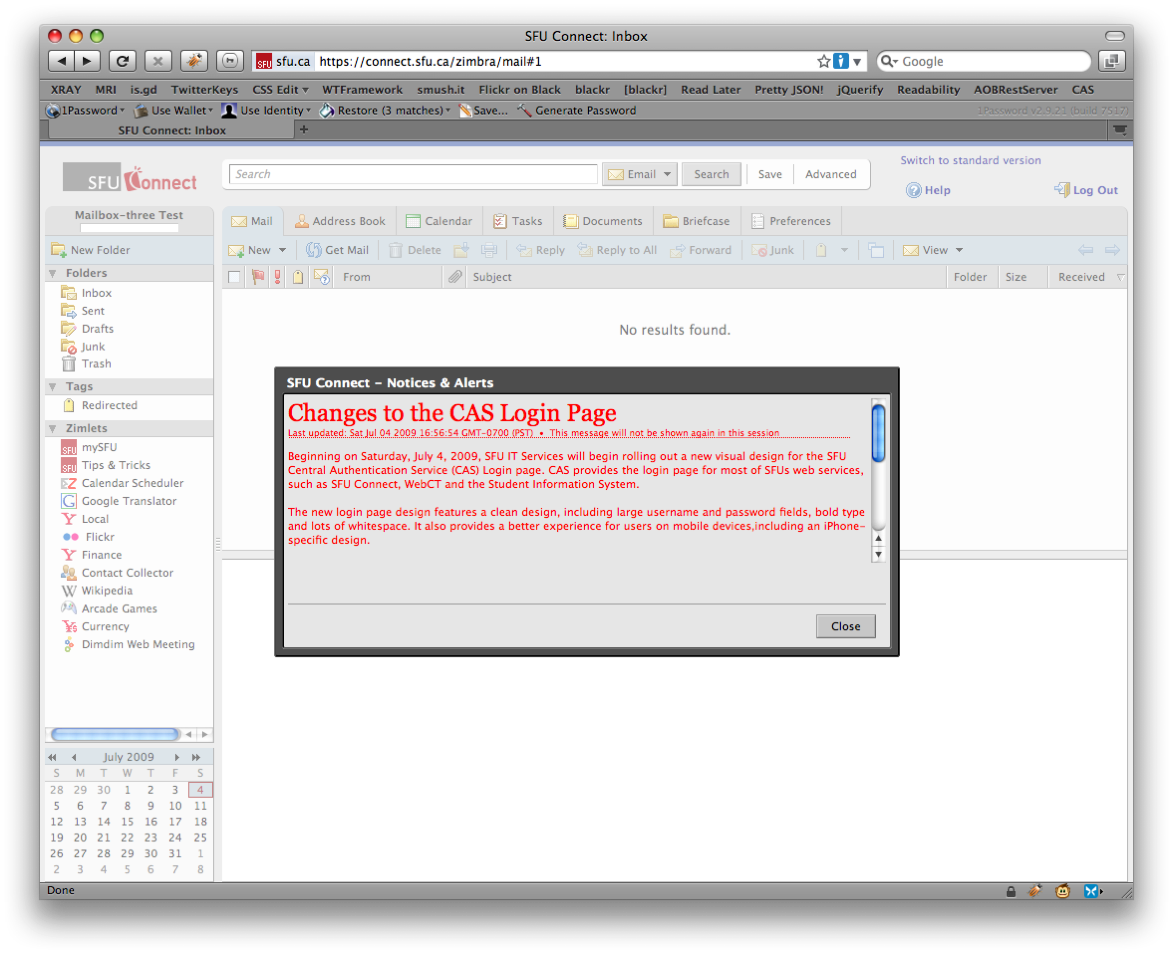
SFU is taking advantage of Zimbra’s open source functionality by using several Zimlets – including Calendar Scheduler, Arcade, Google Translator and Yahoo Local – we are able to extend the product and bring features to people who may not have otherwise found these resources.

We have even generated Zimlets of our own. These SFU Zimlets offer students and faculty a simple way to access course information, alerts/tips & tricks and their mySFU profiles. The course resource Zimlet is definitely the most important Zimlet for the students. It allows them to pull up all their course information for the current, past and next term, including the course description, syllabus, video content and digitized lectures. It helps to keep students organized and on track to graduate. Faculty and staff also utilize Zimlets to reserve rooms and equipment.

Additionally, we have branded Zimbra as SFU Connect, and we got the community involved by holding a naming and logo contest. We’ve personalized SFU Connect by providing users with a tip/trick or message of the day upon startup to help them use the portal to its full capacity.

 
What are your students and/or faculty saying about Zimbra?

Zimbra satisfied the desire of the students and faculty to have access to a modern, feature-rich, communications environment. Not only is the email and calendaring solution functional and well-suited to serve the entire campus, but its open source nature is lauded by faculty and students alike. By choosing an open source product, SFU has the potential to integrate with other products as the University’s needs continue to evolve.


Use the Sticky Notes Zimlet to make quick notes about an email

Posted in PowerTips - Users, Zimlets by Raja Rao on July 14th, 2010

Lot of times you need to make a quick note about something in an email or a little reminder for yourself like “I need to confirm those dates” or “add John’s phone number” or “attach the PPT” etc.  But there is no easy way to capture that thought instantly.  Sticky Notes Zimlet helps solve that problem by allowing you to attach a note to a particular email.

The Sticky Notes Zimlet is really easy to use…all you do is make a quick note and attach it to your email. Once you attach your Sticky Note, it will automatically pop up the next time you re-open your email.

How to create your own Sticky Notes:

Simply select an email and click on the “StickyNotes” toolbar button or drag and drop your email onto the Zimlet to add your notes.

StickyNotes in Contacts (v1.6+):

Similar to emails, you can attach notes to Contacts as well. Simply select a Contact and press “StickyNotes” button.

StickyNotes in Calendar (v1.6+):

Similar to emails, you can attach notes to Appointments as well. Simply select a Contact and press “StickyNotes” button.

How to Enable the Sticky Notes Zimlet:

Click on “Sticky Notes” in the left overview pane and select the following:

a. Select “Add StickyNotes button to main toolbar” checkbox

b. Select “Enable Sticky Notes Zimlet” checkbox

StickyNotesPreferences

How to Find Your Sticky Notes (via Tags):

After your enable the Sticky Notes Zimlet, a yellow-colored tag called “Emails with StickyNotes” is created. When you attach a StickyNote to your email message, your email or conversation will have a yellow tag. This yellow tag is removed when the Sticky Note is deleted.

How to Search for a Sticky Note (via Tags):

You can search and keep track of all of your Sticky Note emails by clicking on the tag or by searching for them in the main search bar.

Download:

You can download the Zimlet here:  http://gallery.zimbra.com/type/zimlet/sticky-notes

Release Notes:

1. Version 1.6 now allows attaching StickyNotes for Contacts & Appoints as well

2. Version  1.5 adds scalability via CustomMetadata API. You can now add Sticky Notes to as many of your emails as you want.

2. Version 1.5+ is only compatible with ZCS 6.0.7+


Appointment Summary Zimlet – Know what your Calendar looks like for the day

Posted in PowerTips - Users, Zimbra Web Client, Zimlets by Raja Rao on July 7th, 2010

Every day, when you first login, this Zimlet scans your calendar and sends out a summary email about the current day’s events.

This Zimlet helps both frequent and lite calendaring users in different ways:

1. For power-users, this is like having a personal assistant; who summarizes appointments for the day, providing a concrete idea as to how many meetings you have.
2. For general-users, the Zimlet helps in reminding you that there is a meeting to prepare for (in case you’ve forgotten)

To make it easier to read, the appointments are sorted and divided along two simple categories:  Those that need your immediate attention (e.g confirmed or new events) and others that don’t (those you’ve marked tentative, free, out-of-office, or declined but not yet deleted).

Download:

Available in our Zimbra Gallery over here

Rate & Review:

After you have used the Appointment Summary Zimlet, please come-back to share what you thought of it at our Gallery.

PS: This is one of our favorite recent Zimlets within the Zimbra team, and we hope you enjoy it too!


Easily schedule, start or join WebEx meetings with the WebEx Zimlet!

Posted in Community, Uncategorized, Zimbra Desktop, Zimbra Server, Zimbra Web Client, Zimlets by Raja Rao on June 15th, 2010

Have you ever found yourself scrambling to find a WebEx meeting invite minutes before the meeting is set to begin? Or if you are scheduling a meeting, you are constantly switching between WebEx and your calendar to create the meeting & calendar invite?

Well, those days are gone with the new WebEx Zimlet. The WebEx Zimlet now brings the power of WebEx right into your Zimbra calendar. To see the WebEx Zimlet in action, checkout this video.

Or to experience first hand, download the WebEx Zimlet at the Zimbra Gallery at http://gallery.zimbra.com/type/zimlet/webex.

Create WebEx meeting just like you would create a regular meeting.

Typically you would switch between Zimbra and WebEx to create a meeting. With the WebEx Zimlet, when creating your appointment in Zimbra, simply press the “Save as WebEx” button to create a WebEx meeting. The Zimlet automatically selects the configured WebEx account to be use (see below for information on multiple WebEx account setup), creates a WebEx meeting, inserts all the WebEx details (WebEx url, phone, passcode, etc) into the appointment body and saves the meeting.

Create a Quick meeting.

Allows users to quickly invite people and create a WebEx meeting.

Start or Join an existing meeting.

You do not have to scramble to find that WebEx invite or goto the WebEx site to find a meeting. You can view a list of meetings on your Webex Calendar and Start (as a host) or Join (as an attendee).

Manage multiple WebEx accounts.

You can store up to 5 WebEx accounts (with related conference calling information). This is especially useful if you are managing multiple shared calendars. For example, if you create a WebEx meeting in the CEO Calendar, the Zimlet will automatically uses CEO WebEx account information.

Full support for recurring meetings.

The WebEx Zimlet supports all of the WebEx recurring types and end-by patterns. Therefore, you can create virtually any kind of recurring meetings in Zimbra and the WebEx Zimlet creates an exact replica on WebEx.

Automatic time-zone configuration.

The WebEx Zimlet maps the 82 supported Zimbra time zones to the WebEx 61 time zones. This allows users to select a time zone and leave the setup of the WebEx meeting to the Zimlet.

Add meeting and tele-conference information to Subject/Location fields.

Lot of times its useful to just put the WebEx meeting and conference information in the location field itself. The WebEx Zimlet has a preference to select what you want to be appended and Zimlet automatically inserts the information.

As you can see, the WebEx Zimlet provides an awesome integration between Zimbra and WebEx. And will greatly simply your day-to-day online meetings.

Note: due to a technical difficulties, we apologize for the many updates and Tweets to this blog post.